Managing people's access to team with roles
Permission levels for teams
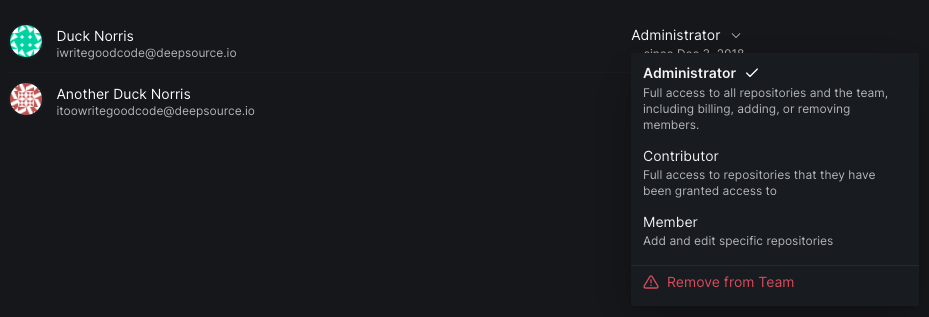
Teams can have administrators, members, and contributors.
-
Administrators have complete administrative access to your team. They can manage billing, add or remove team members, and change roles for other members of the team.
-
Members have the ability to activate analysis on new repositories. This is the default role.
-
Contributors don't have any team level access. Adding a contributor doesn't add against a seat on the paid plan.
| Team Action | Administrators | Member | Contributor |
|---|---|---|---|
| Change Plan (Pricing) | ✔️ | ||
| Update number of seats | ✔️ | ||
| Update Billing Details | ✔️ | ||
| Manage Team Members | ✔️ | ||
| View Access Control Dashboard | ✔️ | ||
| Delete Team Account | ✔️ | ||
| Set Granular Ignore Permissions | ✔️ | ||
| Activate Analysis on Repositories | ✔️ | ✔️ | |
| Sync List of Repositories from VCS | ✔️ | ✔️ |
Change role for a team member
A team administrator can change roles for any team member (except for the team owner).
-
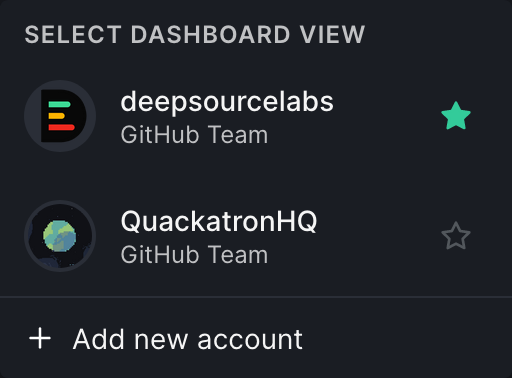
Go to the account switcher on the top left corner, select the team in which you want to change the role of a member.
-
Go to the My team tab on the left sidebar.
-
Find the member you want to change the role for. Click on the drop down arrow on the right side, and select the new role.
-
Read the message in the modal, and if you want to continue, click Confirm and update.

Granular access control permissions
People with admin permissions can manage who is allowed to ignore issues, modify metric thresholds or suppress failed metrics on team owned repositories.
- Go to https://deepsource.io/dashboard, click on the account switcher on the top left corner, select the team in which you want to make the change.
- Go to Settings from the the center navigation bar.
- On the settings page, click on the Access control tab from the left side bar.
Allow contributors or members to ignore issues
To allow contributors or members to ignore issues, select the appropriate checkbox.

Allow contributors or members to modify metric thresholds
To allow contributors or members to modify metric thresholds, select the appropriate checkbox.

Allow contributors or members to suppress failed metrics
To allow contributors or members to suppress failed metrics, select the appropriate checkbox.
