Managing accounts
Our dashboard makes managing accounts easy! You can add multiple accounts from different VCS providers on the same DeepSource dashboard without any hassle.
Types of account
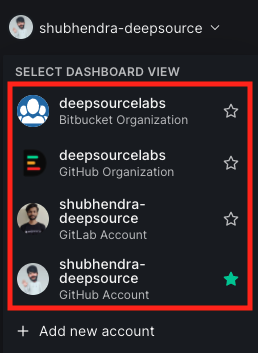
DeepSource supports two types of accounts, Individual and Team/Organization accounts.
- An Individual account is tied to a personal Github, Gitlab, or Bitbucket account.
- An Organization or Team account is tied to a GitHub org, GitLab group, or Bitbucket workspace.
Adding an account
Did you sign up on DeepSource using your GitHub account, but want to add your GitLab account on the same dashboard as well? Or vice versa?
Or, do you want to add a GitHub org account (which you manage) or a GitLab group to your dashboard?
Don't worry - we've got you covered. Here's what you can do:
-
Log into your existing DeepSource account.
-
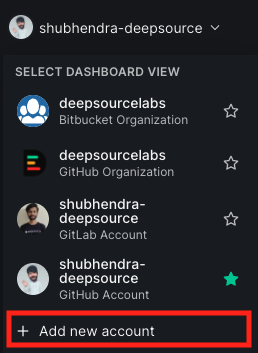
In the upper left corner, click on your username to open a drop-down list, and click "Add new account".
-
Follow the instructions for creating a new account.
If you want to create a new DeepSource account, click on "Signup with GitLab" (or GitHub) from deepsource.io/signup -- Note that if another account exists with the same email address, you will be asked to enter a new email address (no two accounts are allowed to have the same email address).
Set default account
If you have multiple accounts tied on DeepSource and you want to set a particular account to be your default account every time you sign in to DeepSource then you can:
- Click on the Account Switcher on the top-left corner
- In the drop down list, click on the Star next to the account that you want to be your default account

Sign out of an account
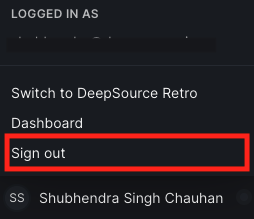
To sign out of an account, click on your name in the bottom-left corner of the dashboard and click the "Sign out" button!
If you have multiple accounts added, you will only be signed out from the current one.